


YoWindow Weather and wallpaper
4.74.47K Reviews
App Specs
- Version
- Varies with Device
- Updated On
- License
- Free
- Downloads
- 10,000,000+
- Developer
- Weather View LLC
- Categories
- Weather
- Platform
- Android
Screenshots



 Analysis by AppCompare
Hey there, weather enthusiasts! If you're anything like me, checking the weather is a daily ritual. Enter YoWindow Weather, a nifty app that turns this mundane task into something a bit more magical. Let me walk you through what makes this app a standout in the crowded field of weather apps.
First Impressions
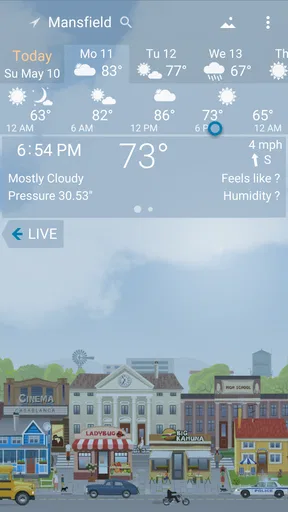
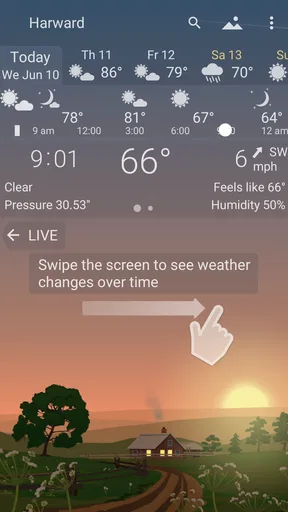
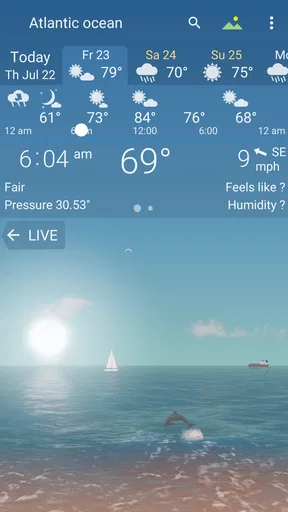
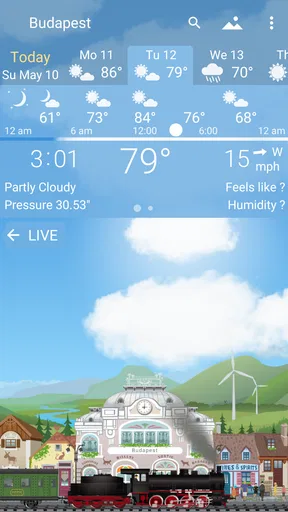
YoWindow Weather is not your typical weather app. From the get-go, the app greets you with a vibrant, animated landscape that reflects real-time weather conditions. Imagine seeing snowflakes gently falling across your screen or the sun setting over a serene landscape. It's like having a little piece of the outside world inside your phone.
One of the things I immediately loved about this app is its simplicity. The interface is clean and intuitive, making it super easy to navigate. No need to dig around for the information you need; it's all there, front and center.
Features That Shine
Now, let’s dive into the features. First off, the app offers a detailed weather forecast, including temperature, wind speed, and precipitation chances. But what sets it apart is the visualization. The landscape changes according to the weather and time of day, providing a unique visual experience that’s both informative and entertaining.
The app supports multiple locations, so whether you're planning a trip or just want to see how your friends are faring across the globe, YoWindow has got you covered. Just swipe through the locations, and the landscape will adjust accordingly. It's like weather teleportation!
Another neat feature is the "weather diary." This allows you to look back and see how the weather has changed over time. It's perfect for those of us who love to track patterns or just reminisce about that surprisingly sunny day in the middle of winter.
Customization and Personal Touch
One of my favorite things about YoWindow Weather is the level of customization it offers. You can choose different landscapes, from rural fields to bustling cityscapes, and even upload your own photos. This adds a personal touch that makes checking the weather feel a bit more special.
Worth Reading Before You Choose

Flipboard Shows What News Apps Must Do Beyond the Feed

Switching to Android Auto Means Rethinking Your Driving Routine

Google Calendar Makes a Crowded Week Easier to Manage

Ludo King Makes the Most of the Minutes Between Plans

Baby Panda World Brings Quick Play to Modern Phones, but Its Game Library Feels Busy

ESPN’s Live Game View Makes Following Close Games Easier
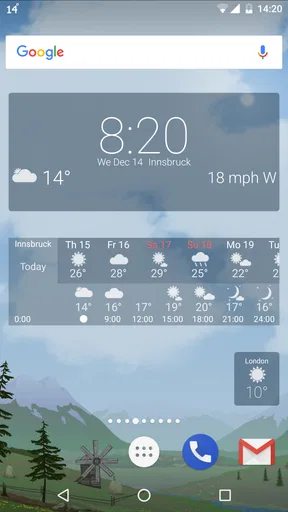
The app also allows you to customize the widget for your home screen. This means you can have a mini version of your chosen landscape right there, offering a quick glance at the weather without needing to open the app.
Performance and Usability
In terms of performance, YoWindow is pretty solid. It updates quickly and runs smoothly, without any noticeable lag. This is crucial for a weather app, as you want the most up-to-date information possible.
Usability-wise, the app is a breeze to use. Everything is intuitive, and even if you're not the most tech-savvy person, you'll find navigating the app straightforward. It's clear that the developers have put a lot of thought into creating a user-friendly experience.
Wrapping Up
So, should you download YoWindow Weather? If you're looking for a weather app that goes beyond the basics and offers a visually engaging experience, then yes, absolutely. It's perfect for anyone who wants a little bit of magic with their meteorological updates.
Overall, YoWindow Weather offers a delightful blend of functionality and aesthetics, making it a joy to use. Whether you're a weather buff or just someone who likes a pretty screen, this app is definitely worth a download. So go ahead, give it a try, and let me know what you think!
Pros
- Visually appealing live wallpaper.
- Accurate and real-time weather updates.
- Customizable weather displays.
- Supports multiple locations.
- User-friendly interface.
Cons
- Consumes more battery with live wallpapers.
- Limited free features without purchase.
- Occasional app crashes reported.
- Ads can be intrusive in free version.
- Requires internet for real-time updates.
FAQs for YoWindow Weather and wallpaper
What is YoWindow Weather and how does it work?
YoWindow Weather is a unique weather app that offers a fun and interactive way to view the weather forecast. It uses animated landscapes that reflect the current weather conditions and time of day. By swiping or tapping, users can easily scroll through the forecast and explore weather details for upcoming days.
Is YoWindow Weather available for both Android and iOS devices?
Yes, YoWindow Weather is available for download on both Android and iOS platforms. Users can find the app on the Google Play Store for Android devices and the Apple App Store for iOS devices. The app is optimized for a wide range of smartphones and tablets, ensuring compatibility and a seamless experience.
Does YoWindow Weather require an internet connection to function?
YoWindow Weather requires an internet connection to update and display the latest weather data. However, once the data is downloaded, the app can display the current and upcoming weather conditions without continuous internet access. This allows users to check the weather on-the-go without using data constantly.
Can I customize the landscapes and themes in YoWindow Weather?
Yes, YoWindow Weather offers customization options for landscapes and themes. Users can select from different animated scenes that match their personal preferences or the current season. This feature enhances the visual appeal and makes checking the weather a more engaging experience.
Is there a cost to download and use YoWindow Weather?
YoWindow Weather offers both a free version with basic features and a premium version with additional functionalities. The free version is ad-supported, while the premium version, available through an in-app purchase, removes ads and provides more customization options. Users can choose based on their needs and preferences.


